
|
Trailing stops and initial stops tradesim: |
Post Reply 
|
| Author |
 Share Topic Share Topic Printable Version Printable Version Delicious Delicious Digg Digg Facebook Facebook Furl Furl Google Boomarks Google Boomarks Google Buzz Google Buzz MySpace MySpace Newsvine Newsvine reddit reddit StumbleUpon Translate StumbleUpon Translate Twitter Twitter Windows Live Windows Live Yahoo Bookmarks Yahoo Bookmarks Topic Search Topic Search  Topic Options Topic Options
|
jazza 
Regular 

Joined: 10 Aug 2007 Posts: 33 |
 Post Options Post Options
 Quote Reply Quote Reply
 Topic: Trailing stops and initial stops tradesim: Topic: Trailing stops and initial stops tradesim:Posted: 23 Mar 2009 at 6:55pm |
Hoping someone can help. Trying to backtest the JB profitaker on tradesim. Can achieve the main entry and exit criteria of:
However cannot get the programming to work for the stop or trailing stop as below: STOP: Initial stop is just under the recent low but once prices continue to rise then use a Volatility Trailing Stop. Exit after two consecutive closes below trailing stop. The stop is two times the ATR subtracted from the close: HHV(C-2*ATR(10),15)
Any programming wiz people out there that can help.
Thanks in advance,
Jazza
|
|
 |
|
|
rcameron
Moderator Group 
Joined: 04 Aug 2008 Posts: 21 |
Post Options
Quote Reply
Posted: 26 Mar 2009 at 3:49pm |
|
The coding you are using for the exit has an error, rather than Mov(H,13,E) try ma(H,13,E). Too start learning how to run Tradesim scans, my suggestion is that you use Bullcharts pre-coded indicators in the Entry and Exit sections. Once you get the knack then use Bullscript - in other words take the easy way out in the early stages.
Like you I wanted to backtest Berg's system so I modified the Bullcharts code and wrote the following indicator so that I could select each of the Entry, Exit etc criteria when writing a scan without using Bullscript and risking an error in coding. You can easily select the Entry and Exit criteria, but a few tips for you using an example.
First, in setting up the Tradesim scan go to the Entry tab and select "New", in the Category dropbox select "is an indicator signal" and then in the indicator drop box below the Category drop box select JB Volatility Profit Taker 1 (or the name you apply to the code provided below), then click on the "Parameters" button and select "Entry"i.e. Berg's blue bar) in the Marker Drop box, then "OK". Repeat this process in the Exit tab except select "Exit" or "Stopped out" or repeat if you want to test with the Stop and Profit taker exit.
Complete the other steps in setting up the scan and then run it. It is relatively straight forward but remember that Entry and Exit criteria in my coding are "indicator signals" and cannot be seen unless you select the "is an indiactor signal" in the Category drop box. Make sure you understand the differences between each category.
It is a bit difficult to convey clearly what I mean but let me know if you need any further clarification.
Cheers Rod
JB Volatility Profit Taker 1
[citation ="'Share Traders Handbook', Jim Berg;'A Winning Combination for Traders', Jim Berg, Leverage July 2004 Issue 32 p15-17 www.leveragemag.com.au" ][target =Price; author=Cameron, Rod; category=Stop Loss|Volatility]al := input("ATR Length", 10, 1);am := input("ATR Multiplier", 2, 0);use15 := input("Combine with P15 1=yes, 0=no", 1, 0, 1);mamethod := inputma("MA method",EXPONENTIAL);n := input("MA Time periods",13,1);lhn := input("Low High periods",20,1);sn := input("Stop High periods",15,1);[name =JBPT; color=Orange]pt := ma(H,n,mamethod) + am*ATR(al);pt; [name =Stop; color=Black]ts := hhv(C-am*ATR(al),if(use15,sn,1));ts; { Markers } { Note: These markers do not include the stop after initial entry, which is placed just below the previous trough } entry := cross(C,(llv(L,lhn)+am*atr(al)));takeprofit := cross(C,pt);stopped := C<ts and hist(C<ts,1) and hist(C>=ts,2);inMarket := if (entry, true,if (takeprofit or stopped, false, prev));[name =Enter; linestyle=marker; color=Green; marker=type3; tooltip="Volatility Start"]inMarket and not hist(inMarket,1);[name =Exit; linestyle=marker; color=Green; marker=type1]not inMarket and hist(inMarket,1) and takeprofit;[name =Stopped Out; linestyle=marker; color=Red; marker=type2]not inMarket and hist(inMarket,1) and stopped and not takeprofit;{ Bar colours } r1 := ( llv(L,lhn) + am*atr(al));r2 := ( hhv(H,lhn) - am*atr(al));jbmode := if (C>r1, 1, if (C<r2, -1, prev) );[linestyle =PriceColor][name =Rising; color=rgb(30,70,190)] jbmode = 1;[name =Oversold; color=FireBrick] jbmode = -1;
|
|
|
|
|
jazza
Regular
Joined: 10 Aug 2007 Posts: 33 |
Post Options
Quote Reply
Posted: 30 Mar 2009 at 9:35pm |
|
Hi Rod,
Much appreciated for your reply. Thanks for pointing out the error. I actually used the ma(H,13,E) for the exit in Tradesim rather than the Mov(H,13,E). I copy/ pasted the (Mov) from a Jim Berg article for the forum. I am not a metastock user but I think mestastock uses (Mov) and Bullcharts uses (ma) In my Tradesim programing I used the method you suggested. Was able to get entry and exit. The stops caused me problems. Everywhich way I tried, caused an exit on entry day, causing bizare results. The problem is that stops do require a bullscript. Even the default setting of 2* ATR causes this exit on entry day problem. I was using a trial 2 week test of the Tradesim which has now expired. I would buy it if I could figure out how to program the stops and trailing stops. Trouble is that the extensive manual is written for Metastock. There is minimal written info on using Tradesim with Bullcharts! Would be very interested if you could let me know how you achieved your initial stop and trailing stop criteria in the back test. Also did the Berg system stack up? Cheers for now, Tony |
|
|
|
|
maximo
BullCharts Guru 

Joined: 02 Sep 2006 Location: Australia Posts: 232 |
Post Options
Quote Reply
Posted: 31 Mar 2009 at 1:50am |
|
I'll post these screenshots which maybe of help to you for Tradesim and JB system. Note: The Berg system has 3 other entry rules which look to be important in it's implementation.
Cheers!
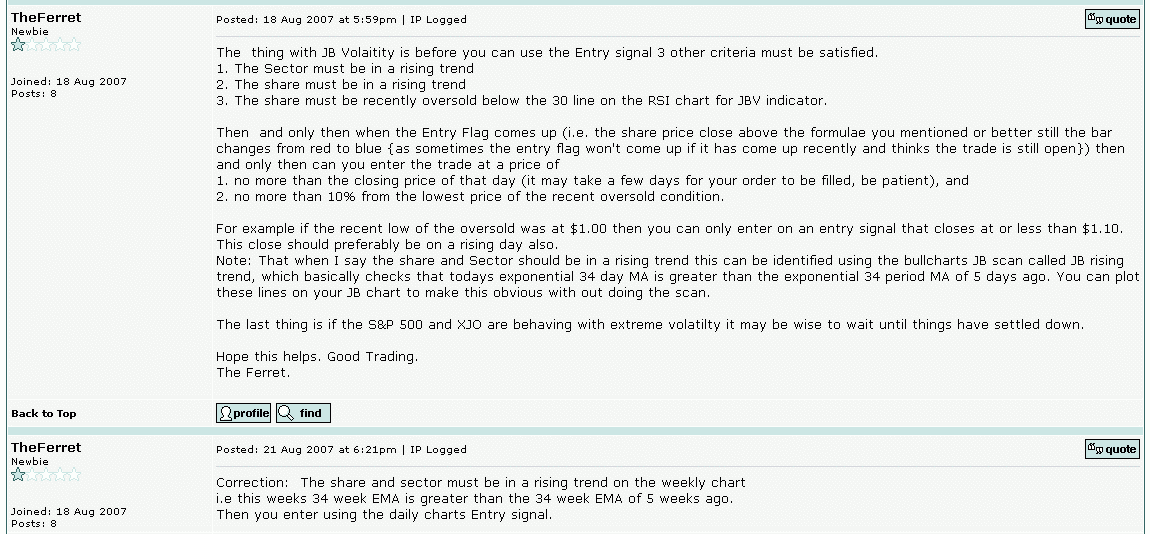  Edited by maximo - 31 Mar 2009 at 1:51am |
|
|
|
|
jazza
Regular
Joined: 10 Aug 2007 Posts: 33 |
Post Options
Quote Reply
Posted: 31 Mar 2009 at 10:35pm |
|
< ="-" ="text/; =utf-8">< name="ProgId" ="Word.">< name="Generator" ="Microsoft Word 11">< name="Originator" ="Microsoft Word 11">
Hi Maximo, Thanks for collating the screen shots from the wiz programmer ‘Ferret’ Thanks to the both of you. I will have to wait until I purchase Tradsim to see how I go. Will get onto it soon and let you know how I go. Is it possible for you or Ferret to decipher the exit coding in laymen’s terms for me so I can understand what I will be entering? LongEntryPrice : = Open: (Opening Price)? LongInitialStop:= Ref(LLV(L,3),-1)-0.01; {OPEN – 1 .5*Ref(ATR(30),-1;} I understand (LLV(L,10) but can you explain Ref, and -1)-0.01? Assume the second part is open minus 1.5 atr over 30 days ? LongTrailingStop:- Ref(LLV(L,10),-1)-0.01; LongTrailingStopTrig:- L< LongTrailingStop LongTrailingStopPrice:- if (Open< = LongTrailStop,Open, LongTrailStop); Thanks in advance. Question: Do you guys by any chance live in Cheers for now, Jazza |
|
|
|
|
maximo
BullCharts Guru
Joined: 02 Sep 2006 Location: Australia Posts: 232 |
Post Options
Quote Reply
Posted: 01 Apr 2009 at 2:43am |
|
Hi Jazza, I don't currently use Tradesim, but do understand the logic as it's Bullscript/Metastock language. From the first line of code: LongEntryPrice := Open; { Buy at market on Open (once entry criteria is met this will get executed in simulation) } Ref( ,-1) is yesterday and the -0.01 is a fraction under the price bar. Since LLV is the Lowest Low Value it's of 3 bars. The alternative Long initial stop uses an Average True Range of the past 30 bars * 1.5 NOTE: This is not the actual JBerg strategy but it does show a working example of Tradesim coding of stoplosses. Unfortunately I live way out in country NSW. Send Ferret a privmsg, he might still be around. Max Edited by maximo - 01 Apr 2009 at 11:21pm |
|
|
|
|
jazza
Regular
Joined: 10 Aug 2007 Posts: 33 |
Post Options
Quote Reply
Posted: 01 Apr 2009 at 11:53pm |
|
Hi Maximo,
Thanks for the explanation. One step further in the coding journey. When I get tradsim I can convert the stoploss into the exact JB formula and see how it goes. Will keep you posted. Thanks again. Cheers, Jazza |
|
|
|
|
jazza
Regular
Joined: 10 Aug 2007 Posts: 33 |
Post Options
Quote Reply
Posted: 10 May 2009 at 6:22pm |
|
Hi Maximo,
Sorry about my long delay in getting back to you. Thanks for posting the Ferret Formulas for stops re Tradesim. I had big concerted go at trying to make them work in conjunction with the JBerg backtest but could not get them to work. So back to the drawing board. Cheers for now, Jazza < id="gwProxy" ="">< ="jsCall;" id="jsProxy" =""> |
|
|
|
|
maximo
BullCharts Guru
Joined: 02 Sep 2006 Location: Australia Posts: 232 |
Post Options
Quote Reply
Posted: 17 May 2009 at 12:15am |
|
Hello jazza, Using programs can be frustrating at times. I am having problems myself with another backtesting program called Wealthlab. I have the code but it's having problems plotting indicators while loading multiple symbols and only trading only once per week rrrr. Anyhow don't give up! I have found a source of Jim berg's full methodology, perhaps I can build some code when I manage to finish the other thing with Wealthlab. Jim's strategy looks to be very sound going on long term trend and temporary oversold periods each one are known to work quite well. Try the simple things first and then build up to something more complicated, works for me.
Click on Download for free with filefactory basic. An interesting read.
Max Edited by maximo - 17 May 2009 at 2:59pm |
|
|
|
|
Post Reply
|
| Forum Jump | Forum Permissions You cannot post new topics in this forum You cannot reply to topics in this forum You cannot delete your posts in this forum You cannot edit your posts in this forum You cannot create polls in this forum You cannot vote in polls in this forum |


